
01/10Applications new
Files
Self-hosted file manager with galleries, sharing, resumable uploads and backups.
Idea

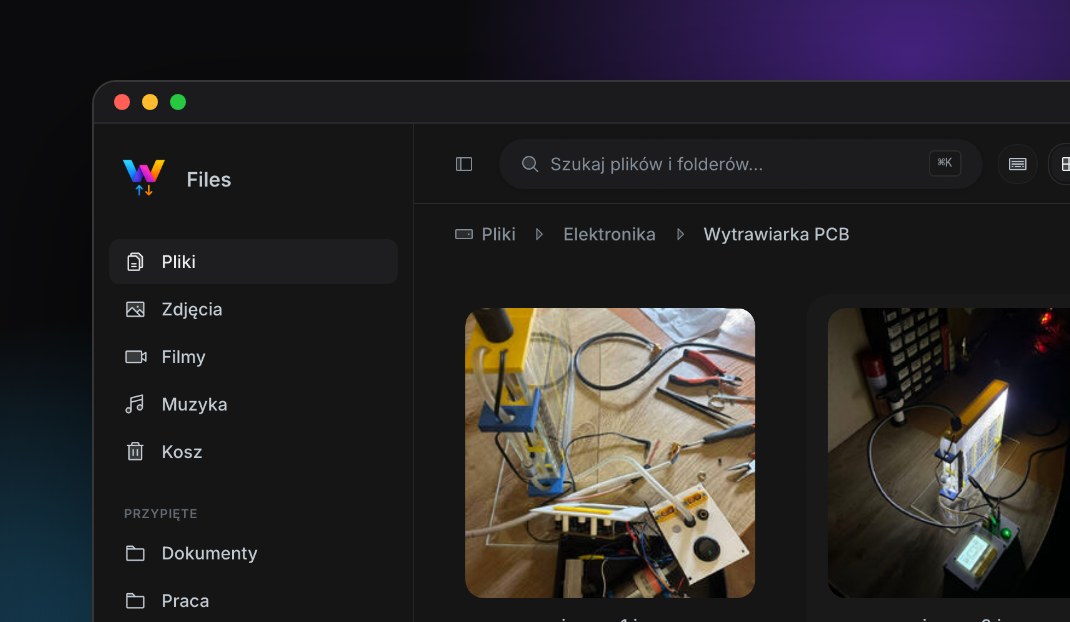
Files is a file manager I designed and built for companies and teams that want the comfort of the big cloud drives without giving up control of their data. The self-hosted options they had looked dated or needed half a server just to start, while the polished services meant handing their documents to someone else. Files closes that gap.
Clients can use it as a cloud service or have it installed on their own Linux or FreeBSD server. There is no database: files sit on disk as ordinary files and folders, so they can be copied, backed up with rsync or moved elsewhere at any time, without exports or conversions. Everything else (folder colours, labels, comments, shares) lives in small JSON files next to them.
Technology stack
12 React
 TypeScript
 Vite
 Tailwind CSS
 shadcn/ui
 Motion
 PWA
 Node.js
 Express
 FFmpeg
 nginx
 FreeBSD
The client is React 19 with TypeScript, built with Vite, styled with Tailwind CSS v4 and shadcn/ui on Radix primitives, animated with Motion. It installs as a PWA on iOS, Android, macOS and Windows. The back-end is a lean Node.js + Express server with JWT sessions in httpOnly cookies, bcrypt passwords and a WebSocket channel that pushes every change to all open windows at once. Thumbnails for photos, videos, PDFs and design files are generated on the server with FFmpeg, ImageMagick and Poppler and cached. In production it runs under PM2 behind nginx, inside a FreeBSD jail on UNITI's own infrastructure.
Working with files
The goal was for it to behave like the file manager in your operating system, not like a web form. Files supports multi-select with the keyboard, copy, cut and paste between folders, drag and drop, undo with ⌘Z, ZIP downloads of whole folders and a trash you can restore from.
- Folders get a colour and one of ~1,500 icons, so the important ones stand out at a glance,
- labels, pins and comments for organising work across folders,
- a built-in text and Markdown editor for quick notes,
- details panel with previews, including PDF pages.
Search
A command palette on ⌘K searches every file and folder you have access to and jumps straight to it, which is much faster than clicking through a deep folder tree.
Uploads that survive a bad connection
Large files are sent in chunks. When the connection drops for a moment, Files resumes from the last chunk on its own. If you close the tab, picking the same file again in the same folder within 24 hours offers to finish the upload instead of starting over. Everyone else looking at that folder sees the progress live.
Photos, videos and music
Media gets dedicated views instead of a plain list: a photo gallery with a filmstrip, a custom video player with keyboard shortcuts, and a music player with a waveform, all streamed with HTTP range requests so long videos start immediately.
Sharing
Sharing was designed around how people actually exchange files with clients:
- links to files or folders, optionally protected with a password and an expiry date,
- file requests: a link that lets someone without an account drop files straight into a chosen folder, without seeing anything else,
- shared folders between team members with their own permissions.
Both light and dark themes are built from the same design tokens, and every screen is checked in both.
Backups
Every account can schedule its own backups (every 2, 6 or 12 hours, daily or weekly) or make one by hand. The page answers the only question that matters in plain words (are my files protected?) and shows the five backup slots as a rail, with the copy that will be rotated out next highlighted.
A backup is a ZIP with all files plus their metadata (icons, colours, labels, comments), so restoring brings back the whole look of the folders, not only their contents.
Administration
Administrators approve new accounts, set storage quotas, decide who can see whom, and switch individual features on or off per user (photos, music, sharing and so on). Usage statistics show storage, uploads, downloads and shares over time for the whole server and for each person.